Installation
- The ü CODESYS development environment ≥ V3.5 SP17 Patch 3 is installed.
Download add-on from the WAGO Download Center:
- Open the ü WAGO Download Center.
- Click the “PLC Agent” add-on under “CODESYS Add-ons.”
- Click [Download] and agree to the Privacy Policy and the WAGO Software License Terms.
Install add-on in CODESYS: - Open CODESYS as an administrator.
Logging in with administrator rights is required to install add-ons. - Open the CODESYS Installer… via the “Tools” tab or via the Start menu > “CODESYS” > “CODESYS Installer.”
- Click [Install file(s)] at the bottom of the “Add-ons” area.
- Select the downloaded *.package file for the add-on.
- Click [Open] and follow the instructions in the installation process.
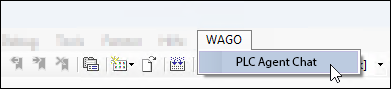
- After installation, you will find the add-on as a “WAGO PLC Agent” menu entry in the “WAGO” tab.
- Installation directory:
C:\Program Files\CODESYS[version]\CODESYS\PlugIns