“General” Tab
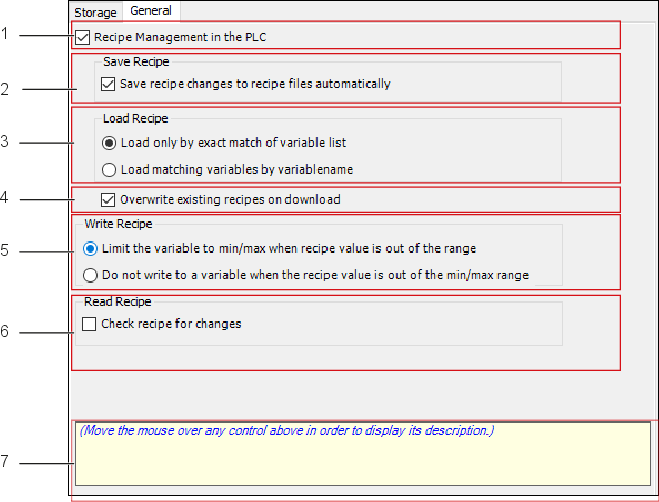
Position | Designation | Description | |
|---|---|---|---|
1 | Formula Management in the PLC |
| Disables the following options: “Save Formula,” “Load Formula” and “Overwrite Existing Formula on Download.” |
| A POU (Programming Organization Unit) is created in the runtime system for formula management. | ||
2 | Save Formula | ||
Automatically Save Formula Changes to the Formula Files |
| Does not automatically save changes. | |
| Automatically saves formulas to a file after a change. | ||
3 | Load Formula | ||
Only Load If Variable List Matches Exactly |
| Loads a formula file only if it contains all the variables from the list of variables of an application’s formula definition. | |
Load Variables with Matching Names |
| All matching variable names are loaded from the formula file. Note: | |
4 | Overwrite Existing Formulas on Download |
| Existing formulas are not overwritten when a new application is initialized. |
| Existing formulas may be overwritten when a new application is initialized. | ||
5 | Write Formula | ||
Limit Variable to Min/Max |
| If the formula contains a value outside the value range entered in the definition, the specified minimum or maximum value is written to the PLC variable instead of this value. | |
Do Not Write Variable If Formula Outside Min/Max Range |
| If the formula contains a value that is outside the value range entered in the definition, no value is written to the PLC variable. It retains its current value. | |
6 | Check Formula for Changes |
| Formula is saved without additional checks. |
| Generates additional code to save a formula only if it is changed by using “ReadAndSaveRecipe.” | ||
7 | Tooltips | Moving the mouse over one of the elements listed above causes an additional tooltip to appear at this point. | |


