Assigning Users and Granting Access Rights
- You need to have performed all the steps from section Defining Entities and Creating Users.
- In the “Solutions” menu, click the “Configuration” menu item.
- In the tree structure, select the first entity of type “Building” you created.
- Select the “ACCESS CONTROL” tab.
- Click
 .
. - A new line is added.
- Under “Name,” select one of the users you created (e.g., “Editor 1”).
- Select “Role” and assign the desired access rights to the selected user (e.g., “Editor”).
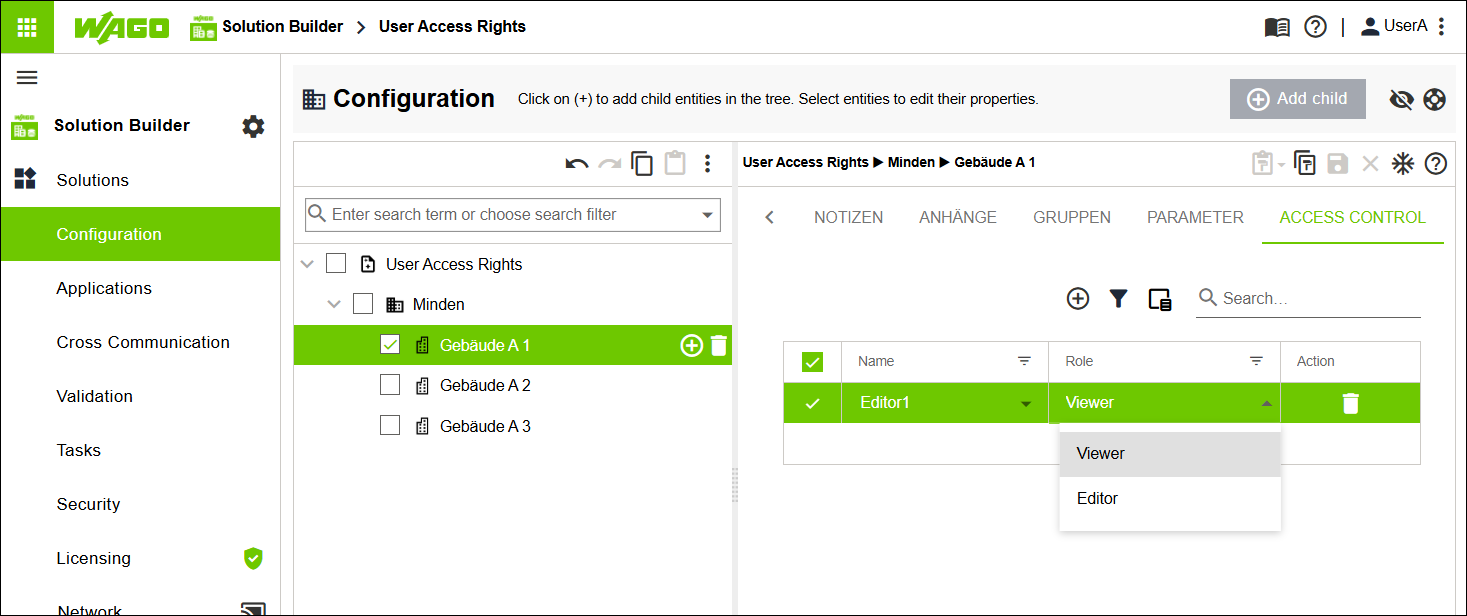
- Repeat the steps for all other entities of type “Building” and assign individual access rights for all other users.
- Click [Save].
- All “Building” entities are assigned individual access rights.