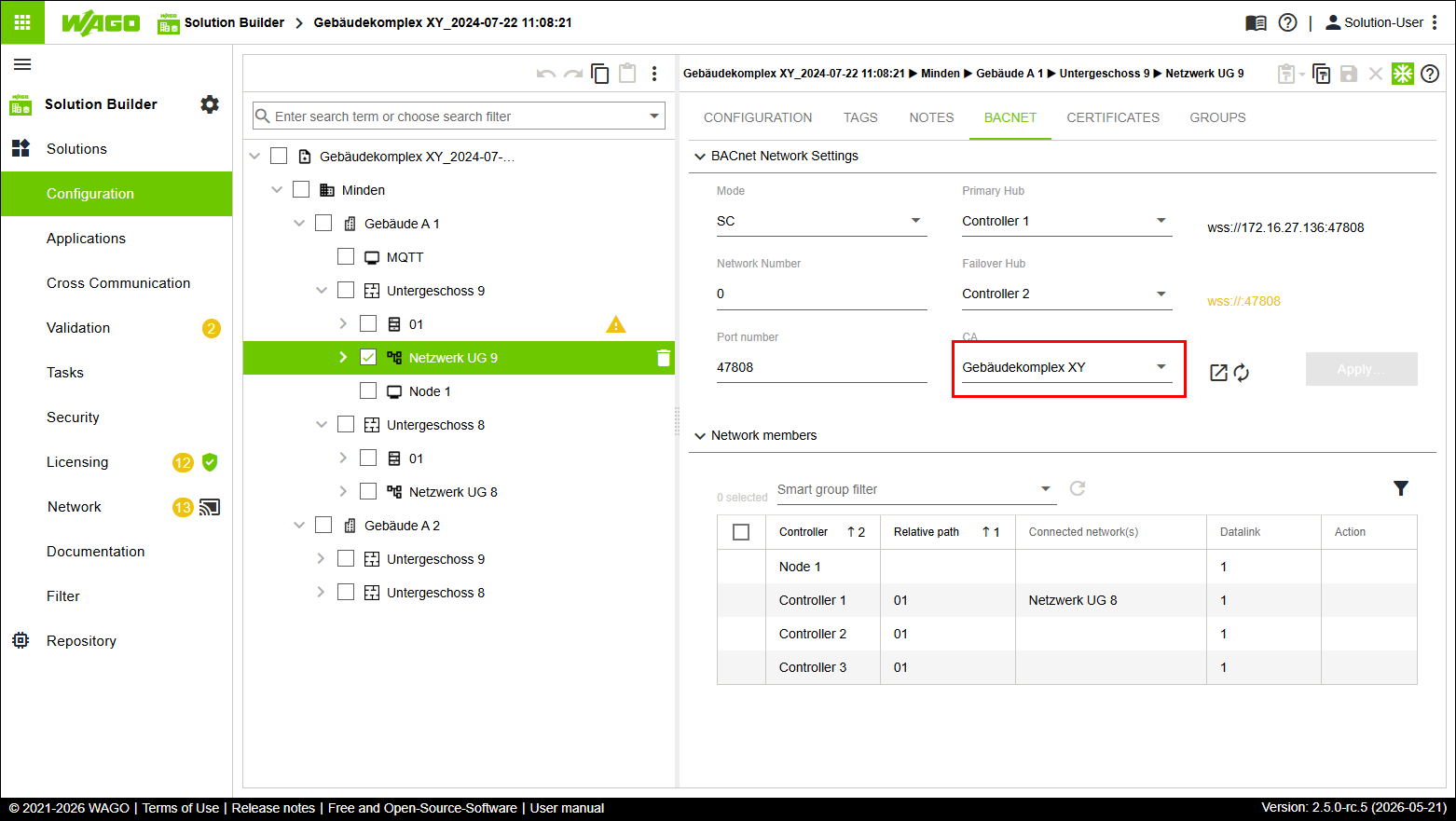
Renewing BACnet/SC Certificates
- Click “Network UG 9.”
- Click the “BACNET” tab.
- From the “CA” drop-down menu, select your existing “root CA” certificate from the root element, i.e. the certificate named BuildingComplex XY in the example.
- Click
 .
. - The “Renew BACnet/SC Certificates” dialog opens.
- Click [Renew].
- The selected “root CA” certificate is distributed to all network participants.
 Note
NoteProject-specific certificates and network-specific certificates can be used side by side!
A certificate does not have to be distributed exclusively via the root element. You can also create your own certificate in an existing entity of type “Network” and distribute it. Project-specific “root CA” certificates and network-specific “root CA” certificates can be used side by side within one solution!
- Click “Network” in the “Solutions” menu.
- Click [Merge Detailed].
- The “Synchronize Differences” dialog opens.
- Check whether the table view contains the “Certificates (BACnet)” entry so it can be synchronized.
- Click [Synchronize].
- The controllers are synchronized.