Devices in the Project
The “Devices in the Project” area shows the device to which the configuration in the workspace refers. Each project contains exactly one device, optionally with connected I/O modules.
Device information, connection and status information, as well as a button for establishing or disconnecting the connection related to the respective device are displayed. The information displayed for devices that are connected online may be more extensive than for devices that are offline.
If the device consists of a head station with attached I/O modules, the I/O modules are listed beneath the head station.
Devices can be renamed, deleted or reconfigured with a different firmware version via the three-dot menu.
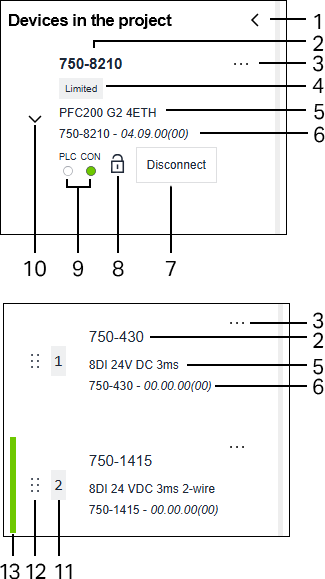
Pos. | Description | |
|---|---|---|
1 | Expand/collapse the view | |
2 | Device Name | |
3 | The following functions related to the device currently being used are accessible from the three‑dot menu: | |
Rename | Rename the device | |
Remove | Remove the device from the project | |
Reboot | Restart the device | |
Configure different firmware version | Configure different firmware version | |
Select item number | Assign a specific item number to a generic I/O module | |
Open product website | Opens the product website in the browser | |
4 | Markings for additional device information: | |
| Not all functions of this device are available in the WAGO Device Manager. Restrictions may apply to configurations or the support of I/O modules, for example. | |
| Conformity with IEC 62443-4-2 is no longer guaranteed due to modifications to the software (disclaimer from WAGO). | |
For more information, see tooltip. | ||
5 | Item description of the device | |
6 | Item number and firmware version of the device | |
7 | [Connect] / [Disconnect] If the device is offline, a button for connecting the device is displayed (see also Connect to Device. | |
8 | The icon | |
9 | The status of a device connected online is displayed by an LED indicator. | |
PLC | PLC | |
CON | Connection | |
10 | Expand/Collapse the view of connected I/O modules (if available). | |
11 | Position of the I/O module within the node | |
12 | Drag handle | |
13 | Highlighting the selection | |


 indicates when the SSL certificate is not trusted (for more information, see
  No application available
 Application running or application in debug
 Application stopped, not configured, in error state or in unknown state
 Device connected
 to move the I/O module to a different position via drag and drop.