Backup/Restore
The Backup function can be used to back up device data. The backup file is stored in a network/PC folder or on a removable medium (SD card or USB memory stick) connected to the device. The backup is stored encrypted by entering a password and contains settings, user data and the CODESYS application.
The Restore function can be used to restore device data from a backup file. To do this, the password that was used when creating the backup must be entered again.
 Note
Note
Note the firmware version!
The Restore function is only possible if the firmware versions are the same at the time of backup and restoration.
Note
Backup/restore can take several minutes!
Creating backup files and restoring data may take several minutes.
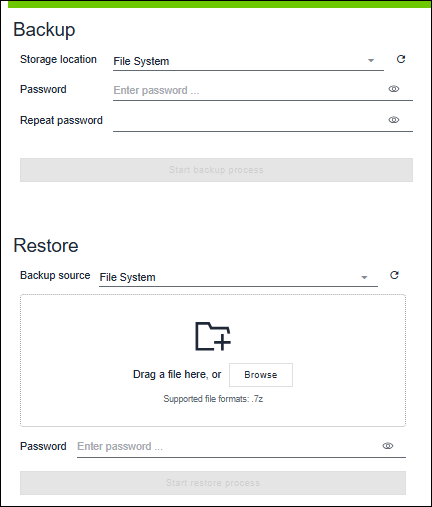
Option/Button | Description |
|---|---|
Backup | |
Storage location | Selecting the storage location for the backup file |
Password / Repeat password | Input field for the password with which the backup file is to be saved. |
[Start backup process] | The button is enabled as soon as a password for the backup has been entered and other processes (e.g., restore or firmware update) have been completed. |
Restore | |
Backup source | Selecting the storage location for the backup source |
| The storage area |
Password | Input field for the password used to save the backup file. The password is verified by the device itself during the subsequent restore process. |
[Start restore process] | The button is enabled once the password has been entered and a valid backup file has been selected. |
 Updates the list of possible storage locations.
 Password input missing.
 Display password in plain text.
 or
or For additional information see:
- Operating > Creating Backup
- Operating > Perform Restore