Main Sections
 Note
Note
The figures and descriptions below are an example configuration
The figures and descriptions given in the „Graphical User Interface“ section are based on a sample configuration.
Your configuration and the contents displayed can differ from that shown here.
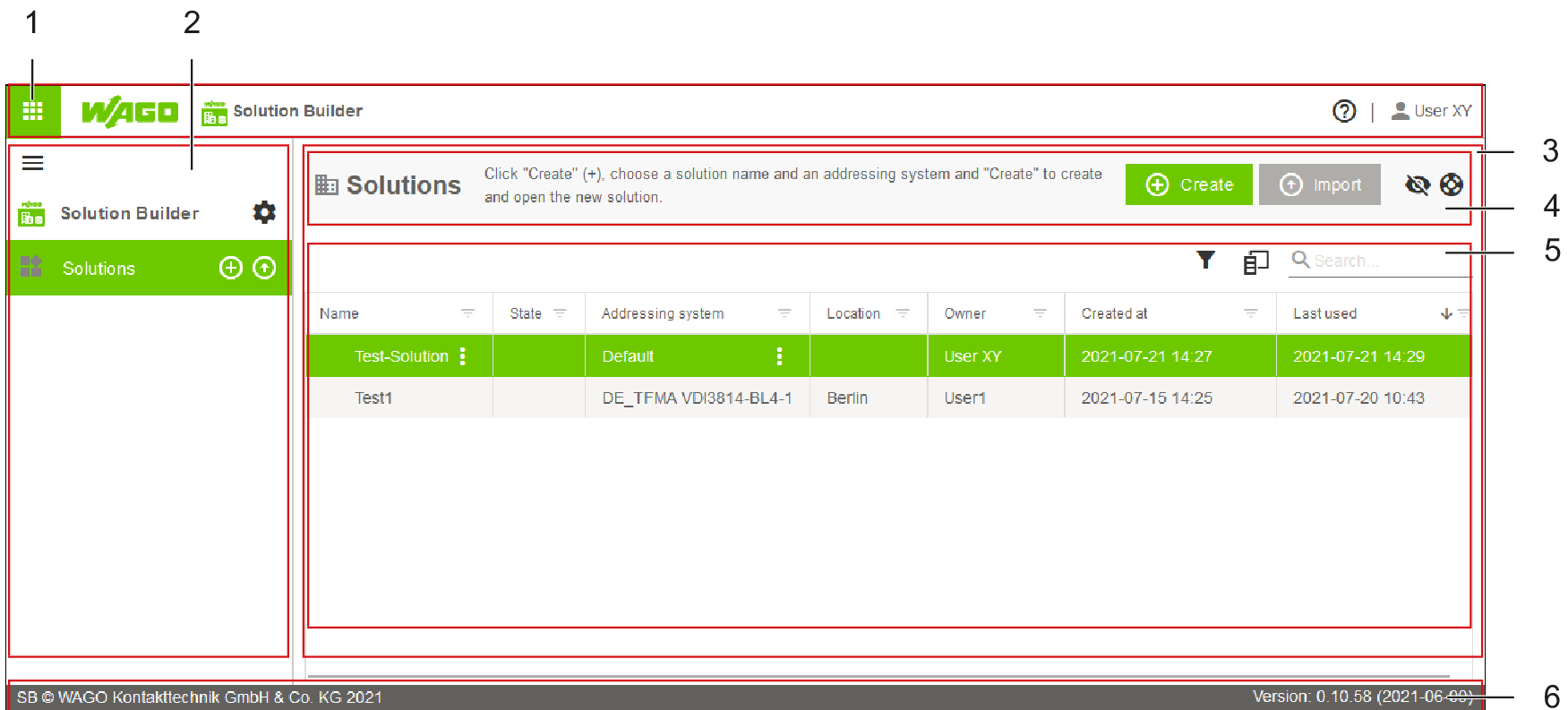
The graphical user interface can be divided into six main sections; in some cases, these display different content depending on the options selected: The graphical user interface has the following structure:
Position | Designation | Description |
|---|---|---|
1 | Header Bar | Shows information about user currently logged in and the current location path and contains icons for Help and the Start screen. For more information, see Header Bar. |
2 | Side Menu | Used for navigating through the selected application. For more information, see Side Menu. |
3 | Workspace | Shows the contents of a solution. The contents of the workspace depend on the selection in the side menu. The workspace is made up of the instruction area and the action area. For more information, see Workspace. |
4 | Instruction Area | Shows context-sensitive tips and manuals. For more information, see Instruction Area. |
5 | Action Area | Within a solution, this area shows the contents of the menu item selected in the side menu. For more information, see Action Area. |
6 | Footer Bar | Shows general information and version notes. For more information, see Footer Bar. |