“User Settings” Area
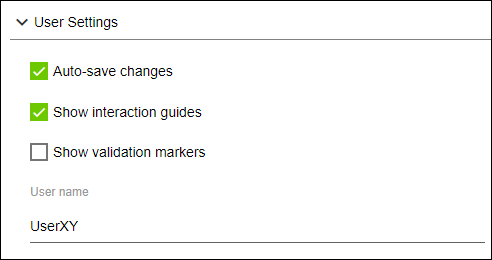
In this area, you can set or change the username or make settings for storing items and displaying interactive Help texts.
Designation | Description | |
|---|---|---|
Save changes automatically |
| Changes must be saved manually at regular intervals or before exiting an area. |
| Changes are saved automatically when you exit a settings area. | |
Show Instructions |
| The Instruction area is not activated and does not appear in the workspace. |
| The instruction area is activated and appears in the workspace. For more information, see Instruction Area. | |
Show validation markers |
| The validation markers are hidden (see Side menu open). |
| The validation markers are unhidden (see Side menu open). | |
Username | Here you can enter the username to use for your own entries in the WAGO Solution Builder software. | |

